
eSIM 如何使用:从下单到在国外联网的全过程
逐步说明下单后会发生什么:如何在 iPhone 和安卓上安装、有效期从何时开始计算,以及没有信号时该按什么顺序排查。
旅行 eSIM 是你现有手机上的第二条线路。流程是:选择目的地套餐、付款、通过邮件收到 QR 码、在家中仍有网络时安装配置文件,抵达后再启用该线路并打开它的数据漫游。安装本身不会开始计时,有效期从手机首次连接目的地网络时算起。本国 SIM 卡仍留在手机中,可继续接听电话和接收短信验证码。

最近更新 2026年10月18日

eSIM 到底是什么
eSIM 是写入手机 eUICC 芯片的运营商配置文件,它能做到 SIM 卡的一切功能,区别只是以下载方式获取,而不是一张塑料卡。配置文件安装到设备后,手机就拥有了在目的地接入网络所需的身份凭证。
旅行 eSIM 的实用之处在于,它是同一部手机上的第二条线路。你的本国 SIM 卡依然保留,照常接听电话和短信,而 eSIM 线路只负责数据流量。
从下单到有网络的四个步骤
- 1选择套餐按目的地或地区挑选套餐,再查看规格表:使用哪些网络、有效期多少天、什么时候开始计算,以及是否可以共享热点。
- 2付款只有在付款成功后,我们才会向供应商下单。每笔订单都带有防重复提交的密钥,因此重复点击或刷新页面不会产生第二笔订单。
- 3安装配置文件扫描 QR 码,或点击邮件中的安装链接。这一步需要联网,所以应在出发前于家中完成安装。安装本身不会启动有效期计时。
- 4抵达目的地后启用落地后,关闭飞行模式,启用 eSIM 线路,打开该线路的数据漫游,并将其设为移动数据线路。
在 iPhone 上安装
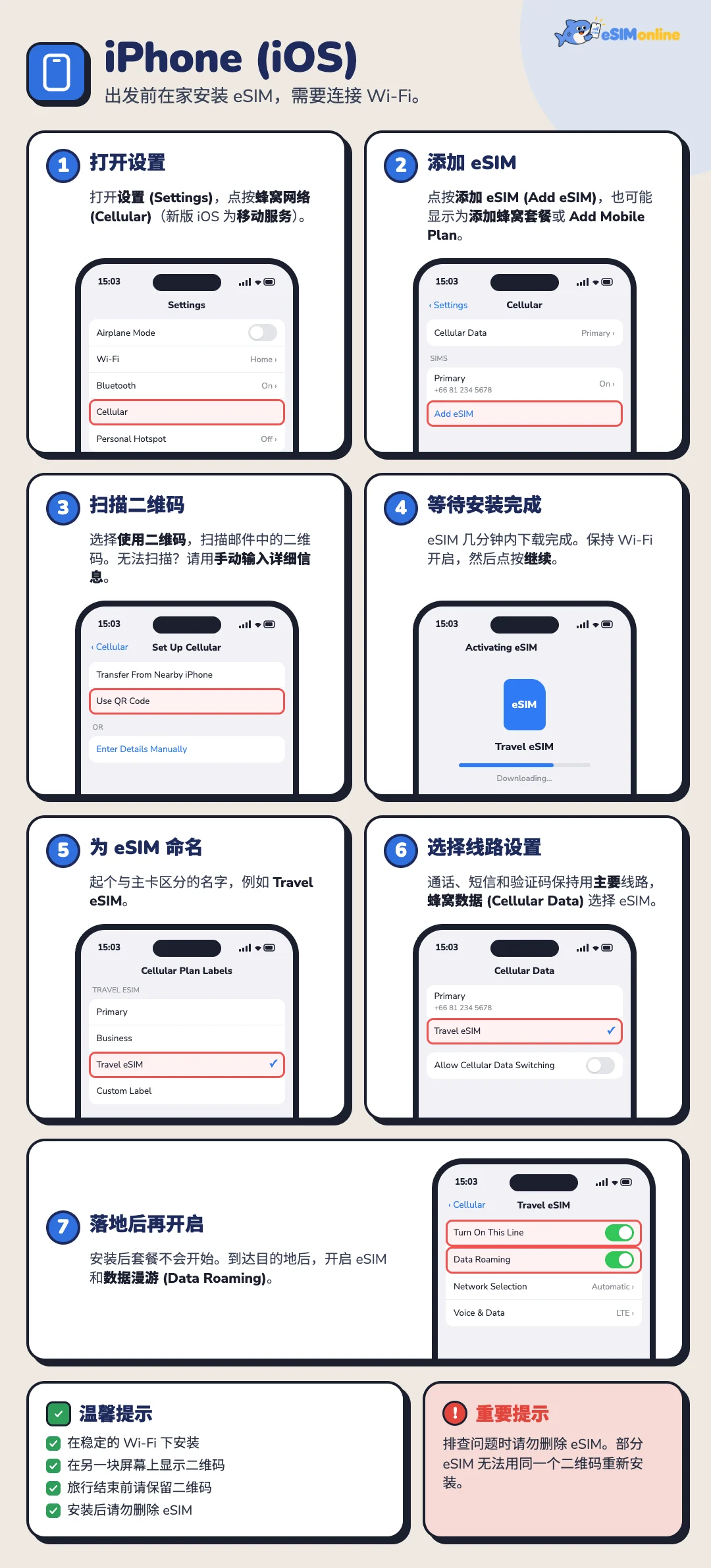
在 iPhone 上使用 eSIM 分为两个阶段:出发前在家安装配置文件(需要联网),以及抵达目的地后开启使用。下文菜单名称以英文版 iOS 为准;较新的版本把 Cellular 称为 Mobile Service,部分地区显示为 Mobile Data。
出发前:安装 eSIM
连接稳定的 Wi-Fi,在另一台设备上打开(或打印)带有 QR 码的订单确认邮件,因为 iPhone 无法扫描显示在自己屏幕上的二维码。
- 打开设置,点按 Cellular(较新 iOS 为 Mobile Service,部分地区为 Mobile Data)。
- 点按 Add eSIM。如果手机已有多条线路,该选项可能显示为 Add Cellular Plan 或 Add Mobile Plan。
- 选择 Use QR Code,扫描邮件中的二维码。如果无法扫描,选择 Enter Details Manually,手动输入邮件中的 SM-DP+ 地址和激活码。
- 等待手机下载并安装 eSIM,通常需要几分钟。期间不要关闭 Wi-Fi 或离开该页面,完成后点按 Continue。
- 为 eSIM 设置标签,方便与主卡区分,例如 Travel eSIM 或目的地国家名。
- 设置线路用途:将主卡(Primary)保留为 Default Voice Line,用于通话、短信和 OTP 验证码;将 eSIM 设为 Cellular Data。
- 抵达后再开启:安装不会启动套餐,先保持 eSIM 线路关闭,到达目的地后再按下一节的步骤开启 eSIM 和 Data Roaming。
抵达目的地后在 iPhone 上使用 eSIM
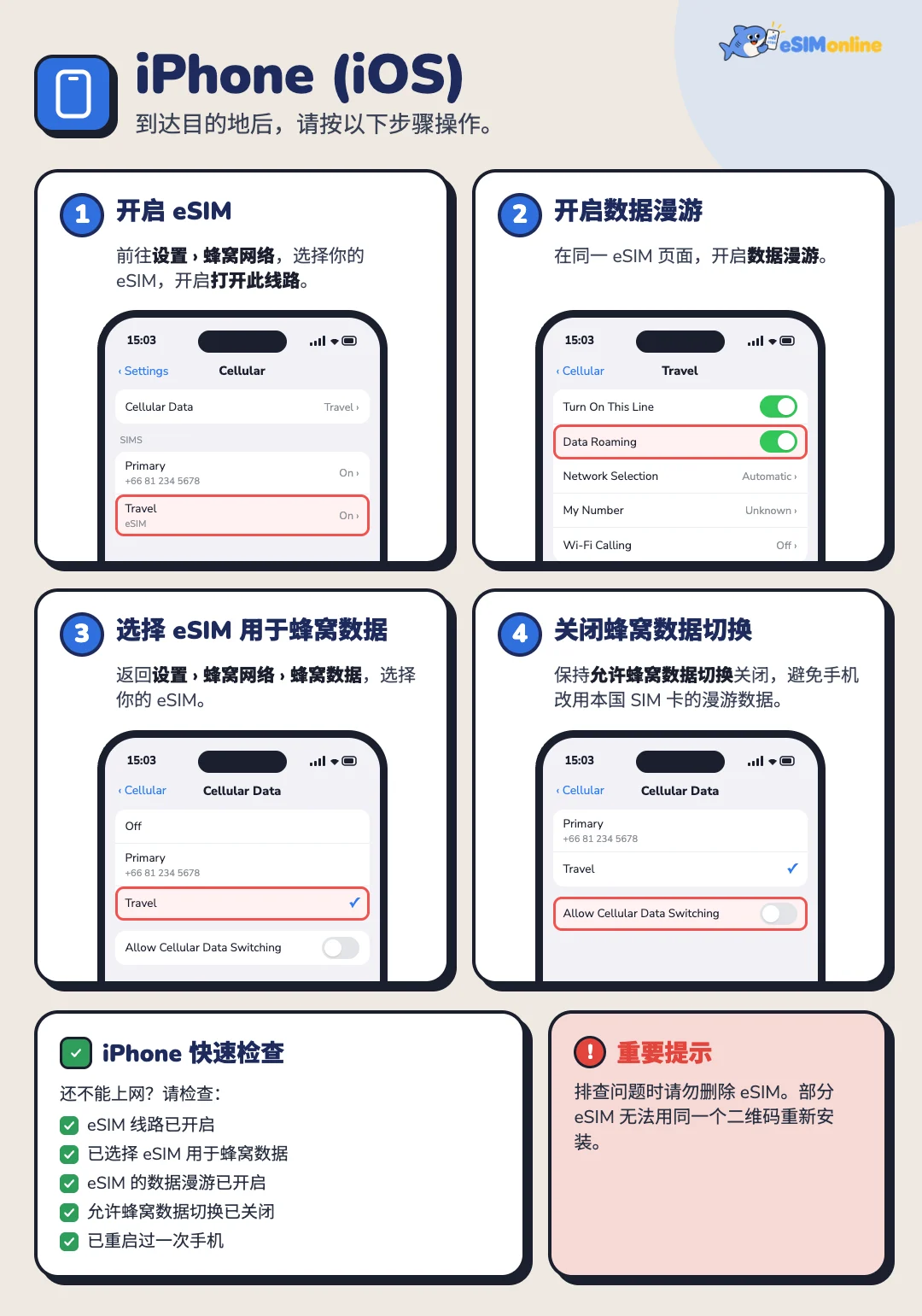
抵达目的地后按以下步骤操作。无需 Wi-Fi,落地后即可进行。
- 开启 eSIM:进入 Settings > Cellular,选择你的 eSIM,打开 Turn On This Line。
- 开启数据漫游:在同一个 eSIM 页面中打开 Data Roaming。
- 将 eSIM 设为蜂窝数据线路:返回 Settings > Cellular > Cellular Data,选择你的 eSIM。
- 在同一页面关闭 Allow Cellular Data Switching,避免手机切换回主卡的漫游数据。
给手机 1 到 5 分钟搜索网络;连接成功后,状态栏会显示当地运营商名称和信号格。主卡的 Data Roaming 请保持关闭,以免产生原运营商的漫游费用。
iPhone 仍无法上网?检查这五项
- eSIM 线路已开启(Turn On This Line)
- 已将 eSIM 设为 Cellular Data
- eSIM 的 Data Roaming 已开启
- Allow Cellular Data Switching 已关闭
- 已重启手机一次
在安卓上安装
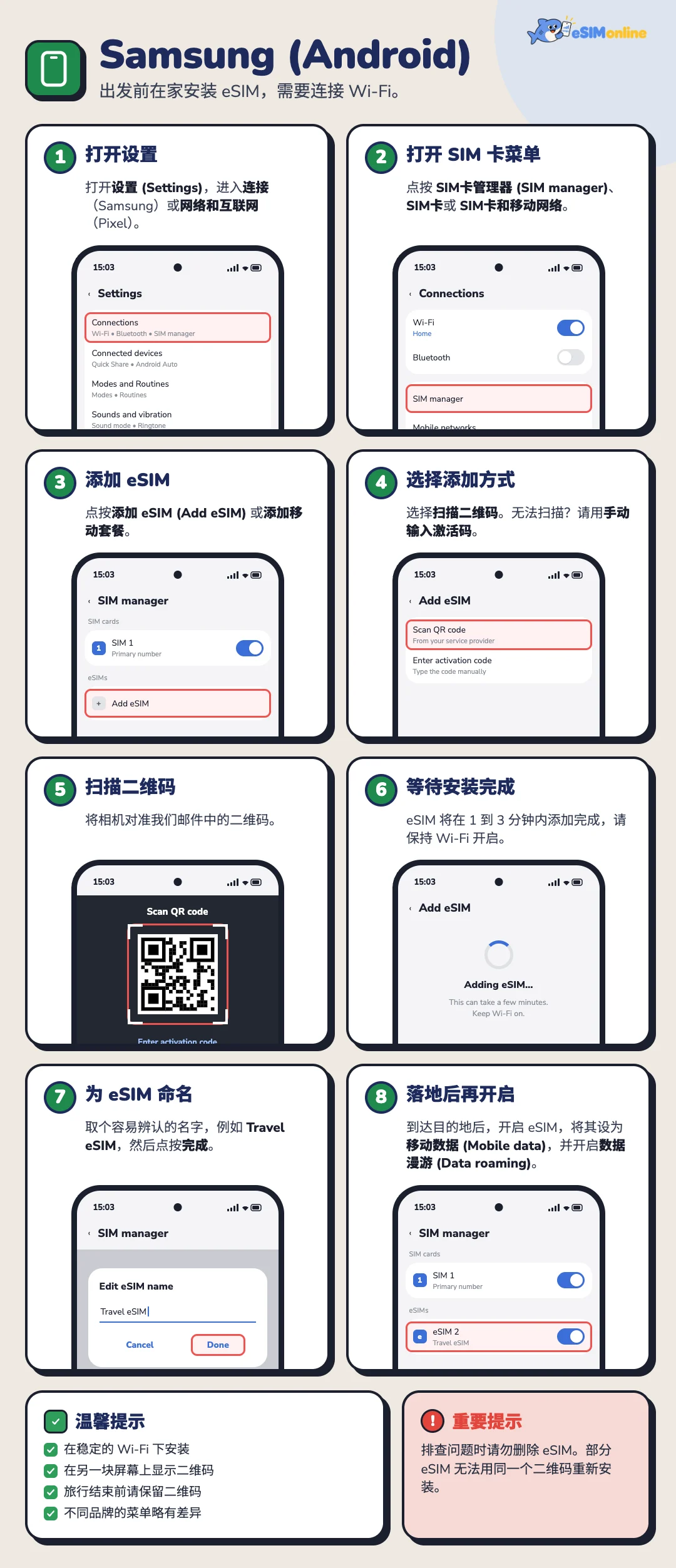
安卓的菜单因厂商而异,但路径大致相似,通常在设置里,然后进入网络和互联网或连接。
以下步骤以三星手机的英文菜单名称为例,其他品牌的菜单路径见本节末尾的表格。
出发前:安装 eSIM
连接稳定的 Wi-Fi,在另一台设备上打开(或打印)带有 QR 码的订单确认邮件。
- 打开设置,进入网络菜单:三星为 Connections,Pixel 为 Network & internet。
- 进入 SIM 菜单,名称因机型而异:SIM manager、SIMs 或 SIM & mobile network。
- 点按 Add eSIM 或 Add mobile plan。
- 选择 Scan QR code。如果无法扫描,选择 Enter activation code manually,输入邮件中的激活码。
- 扫描我们通过邮件发送的二维码。
- 等待 1 到 3 分钟让手机下载并添加 eSIM,期间保持 Wi-Fi 开启。
- 为 eSIM 起一个容易辨认的名称,例如 Travel eSIM 或目的地国家名,然后点按 Done。
- 抵达后再开启:将主卡保留用于 Calls 和 Messages,以便照常接听电话和接收 OTP 验证码,并先关闭 eSIM。到达目的地后,再按下一节的步骤开启 eSIM、Mobile data 和 Data roaming。
| 品牌 | 常见菜单路径 |
|---|---|
| Google Pixel | 设置 > 网络和互联网 > SIM 卡 > 改用下载 SIM 卡 |
| Samsung Galaxy | 设置 > 连接 > SIM 卡管理器 > 添加 eSIM |
| Xiaomi | 设置 > SIM 卡和移动网络 > 添加 eSIM |
| OPPO 和 vivo | 设置 > 连接与共享 > SIM 卡和移动数据 > 添加 eSIM |
菜单路径可能因操作系统版本而有所不同。
抵达目的地后在安卓上使用 eSIM
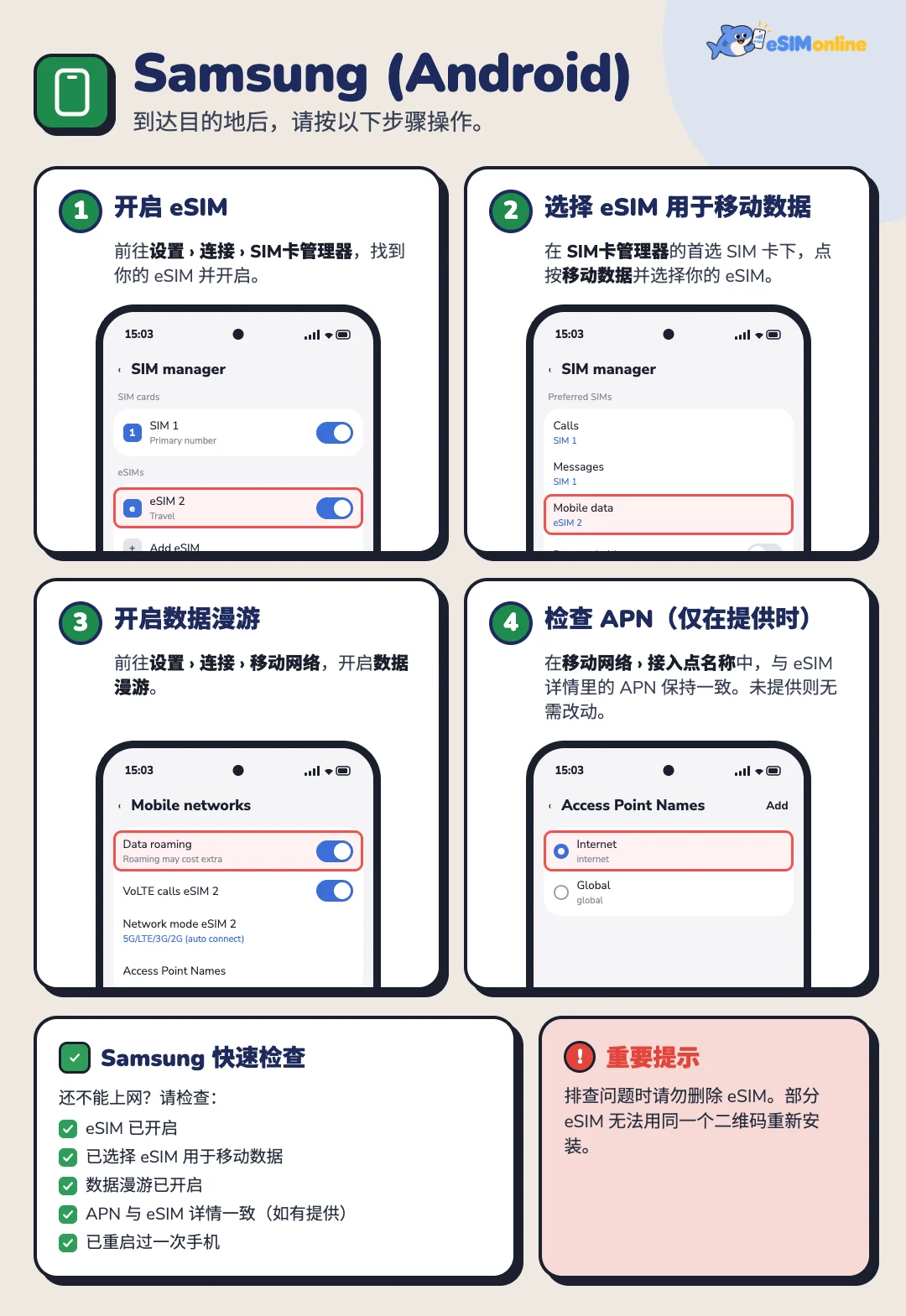
抵达目的地后按以下步骤操作。无需 Wi-Fi,落地后即可进行。
- 开启 eSIM:进入 Settings > Connections > SIM manager,找到你的 eSIM 并打开开关。
- 将 eSIM 设为移动数据:在 SIM manager 的 Preferred SIMs 下点按 Mobile data,选择你的 eSIM;如有 Data switching,请将其关闭。
- 开启数据漫游:进入 Settings > Connections > Mobile networks,打开 Data roaming。
- 核对 APN(仅在有注明时):在 Mobile networks > Access Point Names 中,使 APN 与 eSIM 资料中注明的一致;如未注明,则无需修改。
在 Google Pixel 上,进入 Settings > Network & internet > SIMs,点按 eSIM,在同一页面打开 Use SIM、Mobile data 和 Roaming。连接成功后,几分钟内状态栏就会显示当地运营商名称。
安卓仍无法上网?检查这五项
- eSIM 已开启
- 已将 eSIM 设为 Mobile data
- Data roaming 已开启
- APN 与 eSIM 资料一致(如有注明)
- 已重启手机一次
有效期从什么时候开始计算
套餐大致分为两类:一类在设备首次连接目的地网络时开始计算,另一类在购买时或系统激活时就已开始计算。每份套餐的规格表都会注明属于哪一类,因为这个差异会大幅影响到期日期。
- 除非另有说明,天数按运营商所在时区的日历天计算,而不是累计小时数
- 按日计费的套餐每天重置全速流量,当天用不完的部分不会累积到次日
- 固定总量套餐剩余的流量会在到期后失效
抵达目的地后没有网络怎么办
按以下顺序逐一排查,大多数情况在前三项内就能解决。先不要删除配置文件——删除后将无法重新安装。
- 打开飞行模式十秒后关闭,强制手机重新搜索网络
- 确认 eSIM 线路已启用,并且该线路的数据漫游已打开
- 把 eSIM 线路设为移动数据线路,而不是原有线路
- 从套餐列出的运营商中手动选择网络
- 核对订单邮件中给出的 APN 参数;如果邮件中没有注明,就保持空白
- 重启手机一次
- 如果仍然无法使用,请联系我们,并提供订单号、手机型号以及蜂窝网络设置页面的截图
查看剩余流量,以及 GB 套餐用完后会怎样
购买之后,你可以自己查看剩余流量:通过订单邮件中的链接,或网站的账户页。页面会显示每张 eSIM 的剩余流量、已用流量和总量,并有“刷新”按钮获取最新数字。
示例:流量充足
4.1 GB 剩余
已使用 5.9 GB
总量 10 GB
41% 剩余
示例:即将用完
0.8 GB 剩余
已使用 9.2 GB
总量 10 GB
8% 剩余
GB 套餐的流量是固定的。用完后,这张 eSIM 就无法上网,不会自动扣费,用掉的流量也不会自行恢复。你可以在订单页为同一张 eSIM 充值,无需重新安装或重新扫码。剩余不足 20% 时会出现即将用完的提醒标签。
流量充值与购买第二份配置文件
部分套餐可以在原有配置文件上直接充值,这样比较方便,不需要重新安装。如果套餐不支持充值,就购买新的套餐,并作为第二份配置文件安装在同一部手机上;较新的 iPhone 可以保存多份配置文件,并同时启用其中两份。
我们不做保证的部分
- 具体的网速数值,因为这取决于当地网络状况以及当时当地的拥堵程度
- 偏远地区、地下空间或船只与飞机上的信号覆盖
- 在 eSIM 线路上接收短信验证码(SMS OTP),因为大多数套餐仅提供数据流量
- 如果目的地运营商暂时中止漫游服务,则无法保证不间断使用
常见问题
可以提前几周安装吗?+
可以,前提是该套餐的有效期从首次连接开始计算;不过部分 QR 码有安装截止日期,邮件中会注明。
安装后能换到另一台手机吗?+
一般不能;配置文件与安装时所用的设备是绑定的。如果确实需要换机,请先联系我们,再删除配置文件。
可以在 iPad 或平板电脑上使用吗?+
可以,只要设备支持 eSIM 且未被运营商锁定。可以在我们的设备检测工具中查询你的型号。
真的需要开启数据漫游吗?+
需要,但只需在 eSIM 线路上开启:旅行套餐正是通过漫游接入当地网络来工作的。本国线路的数据漫游则应保持关闭。
如果流量在回国前就用完了怎么办?+
如果套餐支持充值,就可以充值;如果不支持,就购买新的套餐。在此期间,Wi-Fi 以及本国线路的通话功能仍可照常使用。


遇到问题随时联系我们
致电 089-942-0818 · LINE · WhatsApp · 邮箱 esimonline.asia@gmail.com